Remote Access - New deployment option for the Virtual Printer
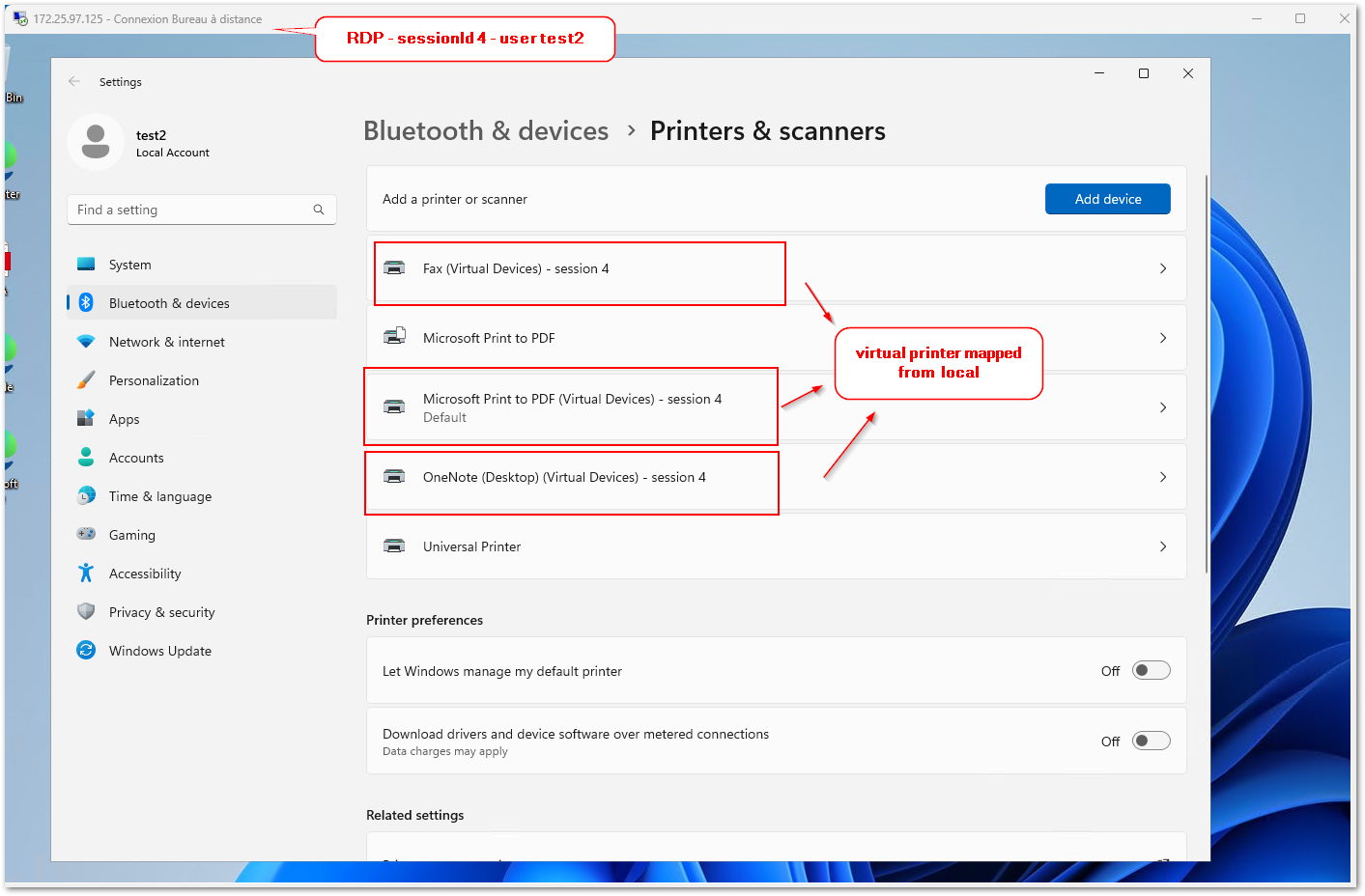
TSplus Remote Access 19.30.5.12 consolidates all improvements and fixes from prior releases, hardens security, and adds streamlined deployment options for the Virtual Printer.
The Virtual Printer is a major TSplus Remote Access feature that allow to print jobs from a remote session and redirects them to the local printers, eliminating physical printer dependencies in virtual environments. As a result, each local printer is mapped to a corresponding virtual printer in the RDP session.
This new MSI installer simplifies enterprise deployment by enabling silent installations via Group Policy, SCCM, or scripts, reducing administrative overhead and ensuring smooth Virtual Printer client rollout across multiple machines.
To install:
msiexec /i Setup-VirtualPrinter-Client.msi /qb-To uninstall:
msiexec /x Setup-VirtualPrinter-Client.msi /qb-
Have an idea or issue? To ensure your feedback is properly tracked and addressed, please use our dedicated channels: Support for issues and Feedback for feature requests. Thank you for helping us improve!
Improvements
Providing MSI installer for VirtualPrinter client (available in tsplus\UserDesktop\files\addons folder).
Improved HTTPS redirection configuration: when the HTTPS port is changed, HTTP to HTTPS redirection will now update automatically to the correct port, preventing client connection errors after port modifications.
Compatibility: TSplus is compatible with Windows 11 26H1 latest preview updates, maintaining seamless operation on cutting-edge OS builds.
HTML5 (v8.89): It is now possible to disable old TLS protocols or ciphers by server instance (see FAQ: /software/html5/faq.html#answer_72), offering granular security control per deployment.
HTML5 (v8.89): For forwarded RDP connections, the iterations of TLS detection can be limited by setting ssl_rdp_underflow_max_iterations parameter in settings.bin (default: 10), optimizing performance in high-latency scenarios.
HTML5 (v8.89): Security improved by strengthening control over X-FORWARDED-FOR header misuse, mitigating potential proxy-based attacks.
Fix vulnerability by updating the log4net dependency to version 3.3.1, addressing known security issues in the logging library.
Fixes
Fixed regression with "All users" applications assignation, ensuring reliable group-based app distribution across sessions.
Connection Client (v126): Hardened the update mechanism to avoid occasional update failures, ensuring reliable auto-updates for end-users.
Admin Tool > Advanced: Changing a configuration from one custom value to another is now correctly handled, preventing data loss during tweaks.
Admin Tool: Preventing exception when restarting Web Server, enabling smooth service restarts without crashes.