Remote Access - Performance
With this version, we have put a strong focus on performance, especially for large-scale systems.
As a reference, we always kept in mind the use case of “100 servers - 1000 applications”.
The goal is to ensure great performance under such conditions.
Now, for users who have 1000 applications assigned, opening a session is smooth.
Also, a fix has been implemented for Floating Panel and Application Panel, with adding scrollbars when assigned apps are too numerous to be all displayed in the form.
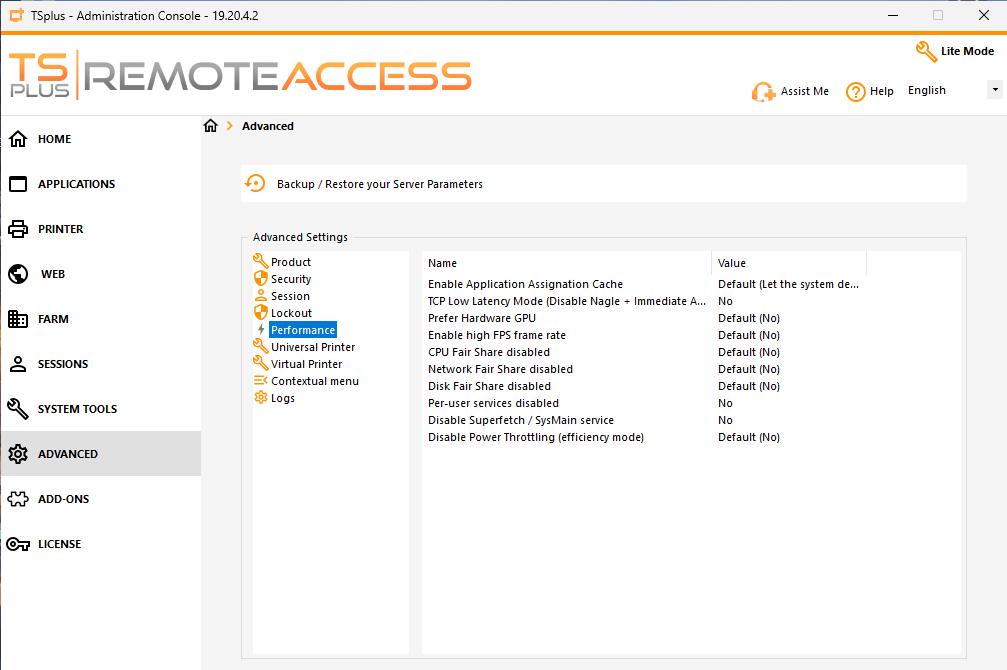
A new Performance section has been added under Advanced Settings:
“Disable Per user services” and “Enable high FPS frame rate” are existing settings, moved from Sessions > Session Management settings
"Prefer hardware GPU" is an existing advanced setting, originally in "Session" section
“Enable Application Assignation cache” greatly improves performance for users with many assigned applications. The default value is “Let the system decide” (it enables caching automatically when more than 25 applications are used in Remote Access) but you can set it to “yes” or “no”
Other settings may improve performance in certain cases, depending on how your servers are used. Please read each setting’s description carefully before modifying its values
Here is the full changelog from the last 2 versions (v19.4.9 and after)
Improvements:
Connection client: added missing langs for translations
Compatibility: TSplus is compatible with Windows 11 26H1 latest preview updates
HTML5 (v8.88): added an option to allow raw HTTP traffic for specific web paths + introduced support for forwarding TLS traffic to a target server
Admin Tool: added a new Performance section in Advanced Settings
Drastically improved login performance for users with large number of applications assigned
Compatibility: TSplus is compatible with Windows Server 2025 latest updates
Fixes:
Web Server: Preventing HTML5 server to be launched multiple times
Web Server: Enhancing mechanism for Java update
Web Portal : Fixed command line parameter injection for Web RemoteApp
AdminTool: fixed non administrators are able to run AdminTool if UAC is disabled on Windows Server 2025
Floating Panel: added scrollbar to display all applications
Application Panel: added scrollbar to display all applications
Thank you for reading this changelog, and thank you for the feedback you regularly provide ; it makes our products better and gives you a better experience!