Remote Support – Users now approve incoming connections
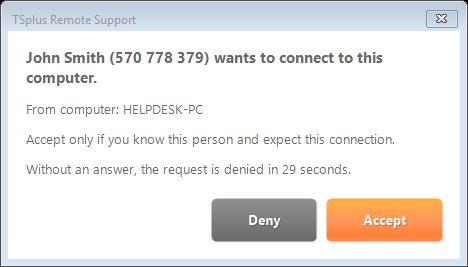
New Remote Support client is out! Users can now be asked to accept an incoming connection before anything is shared or controlled. Administrators can enable it for the whole account or specific folders from the administration portal (documentation). Full changelog below.
Improvements:
Windows: added a setting to ask the user of the computer to accept an incoming connection before anything is shared or controlled, including with unattended access and the remote command prompt
Administration portal: account administrators can require the users of the computers of the account, or of some folders, to accept an incoming connection, and choose the delay to answer
Windows: improved performance of the remote screen display method on the viewer side
Windows: improved P2P support when connecting to a VM hosted on viewer workstation
Devices: faster search and smoother scrolling in the device list of the Windows client, the search text is kept after a refresh, and folders no longer collapse and expand again when the list loads
Fixes:
Devices: searching for a folder name now shows all the devices it contains, and devices stay in their folder when one of their parent folders matches the search
Have an idea or issue? To ensure your feedback is properly tracked and addressed, please use our dedicated channels: Support for issues and Feedback for feature requests. Thank you for helping us improve!