TSplus Remote Access - New Webcam Bridge add-on, session audit and hardened web security
TSplus Remote Access v19.50.11.10 introduces Webcam Bridge, a new add-on for the Enterprise edition, and a new daily journal of session events for administrators. This release also hardens the Web portal and the HTML5 web server against several attack vectors, and keeps HTML5 sessions responsive in inactive browser tabs. TSplus LTS 18 version 18.2026.11.10 and TSplus LTS 17 version 17.2026.11.10 are also available, with the latest security and compatibility updates.
What’s new in TSplus Remote Access
Webcam Bridge
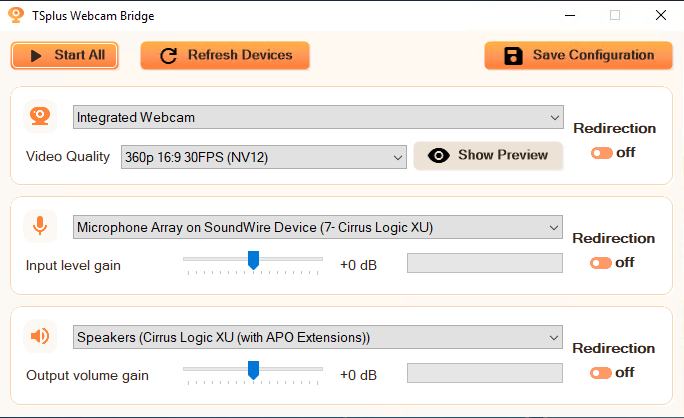
Webcam Bridge is a new add-on for TSplus Remote Access Enterprise edition. It lets users in a Remote Desktop (RDP) session use their local webcam and microphone, and hear the remote session audio through their local speakers or headphones. Users can now join video calls and online meetings directly from their remote session.
You manage Webcam Bridge from the AdminTool > Addons section, and the Webcam Bridge client is included in the Connection Client setup. Please note that Webcam Bridge works with RDP connections only: it is not available in HTML5 sessions. To get started, read the Webcam Bridge documentation.
Session audit
Session audit gives administrators a clear record of who connected, from where and for how long. When you enable it with the command AdminTool.exe /sessionaudit on [retention_days], the session service writes one CSV file per day with every logon, logoff, disconnection and reconnection.
Each line includes the user, session, client name, source IP address, connection type (HTML5 or RDP), mode (Desktop or RemoteApp) and duration. The files are saved in the UserDesktop\files\audit folder of the TSplus installation directory, only administrators can access them, and they are kept for the number of days you choose (10 days by default).
Web security
We have also strengthened web security. The Web portal pages are now protected against script injection from third-party sites, and the RemoteApp launch from the Web portal can no longer be used to create connection links to malicious servers. The web server now blocks downloads from the cgi-bin folder, XSS attacks through the redirection link at session close, and the sharing of malicious files through download links on your server’s domain. We recommend that you update your servers.
Finally, Chrome, Edge and other Chromium-based browsers now slow down inactive tabs to save energy. HTML5 sessions now stay responsive in these tabs, and when the browser pauses a tab completely, the HTML5 connection is closed quickly to free server resources.
Here is the complete changelog for the TSplus Remote Access 19.50.11.10 release:
Improvements
Webcam Bridge: added the new Webcam Bridge add-on, available for the Enterprise edition
Session audit: the APSC service can write a daily CSV journal of the session events (logon, logoff, disconnect, reconnect) with user, session, client name, source IP, connection type (HTML5 or RDP), mode (Desktop or RemoteApp) and duration, in the UserDesktop\files\audit folder (administrators only). Enable it with AdminTool.exe /sessionaudit on [retention_days]
HTML5 (v9.00): improved HTML5 session responsiveness in inactive tabs of Chrome, Edge and other Chromium-based browsers, despite their new energy-saving throttling
HTML5 (v9.00): when a Chromium-based browser pauses an inactive tab entirely, the HTML5 connection is now closed promptly to free server resources
HTML5 (v9.00): when a connection is closed, the web server log now shows how long ago data was last received, sent and actually written
Fixes
License: fixed the number of concurrent sessions being limited to 2 after the license hardware identifier was repaired from the AdminTool, while the license was displayed as valid
Security: hardened the RemoteApp launch from the Web portal to prevent unauthorized users from creating connection links to malicious servers
Security: hardened the Web portal pages to prevent script injection from third-party sites
HTML5 (v9.00): hardened the web server to prevent the download of files stored in the cgi-bin folder
HTML5 (v9.01): prevented XSS attacks through the redirection link at session close
HTML5 (v9.02): hardened the web server to prevent malicious users from using it to share malicious files through download links on the server’s domain
What’s new in TSplus LTS 18 and TSplus LTS 17
All available compatibility updates for Windows 11 25H2 and 26H2 have been included into TSplus LTS 18 version 18.2026.11.10 and TSplus LTS 17 version 17.2026.11.10.
Additionally, we have updated the jQuery library to its latest 3.x version (3.7.1) to improve security.
TSplus LTS 18 also gets the new session audit journal described above. With TSplus LTS 18, we have also fixed the automatic logon through URL parameters (user, pwd...) on the Web Application Portal, which redirected users to the logon page instead of displaying their applications.
Have an idea or issue? To ensure your feedback is properly tracked and addressed, please use our dedicated channels: Support for issues and Feedback for feature requests. Thank you for helping us improve!