Connection Client Generator gets a redesign!
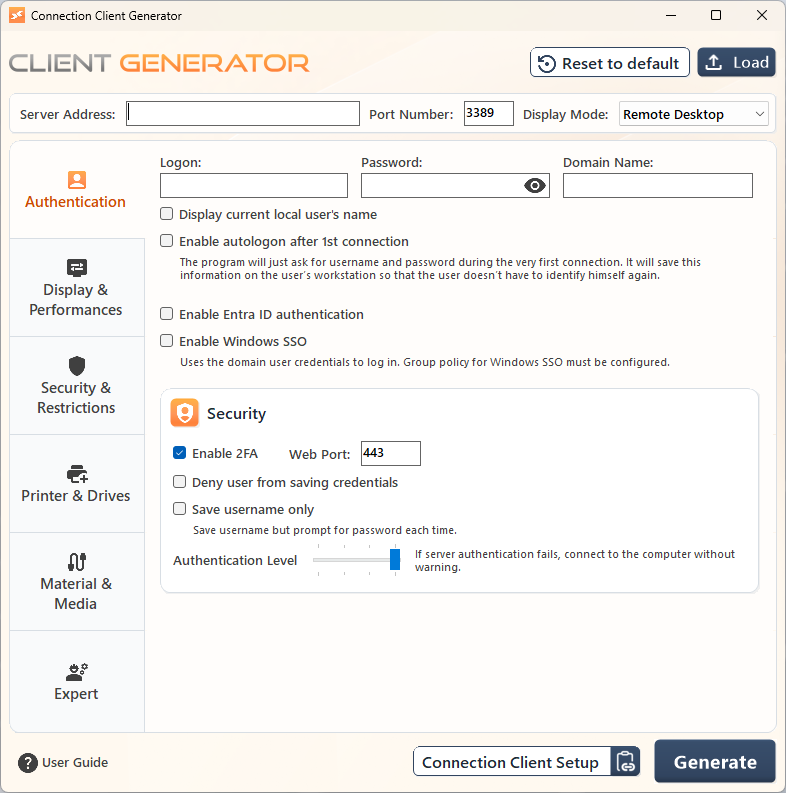
The Connection Client Generator has been redesigned with a cleaner, more intuitive layout that makes the whole workflow faster to navigate.
Reorganized for clarity
The overall layout has been restructured so related options are grouped together, making settings easier to find at a glance.
Drag & drop to load existing .connect files
You can now drag and drop an existing .connect file directly into the generator to load and edit it, instead of starting from scratch every time.
New security & connectivity options
Configure the Remote Computer (Full Address) independently from the RD Gateway address
New 2FA Web Port field
Added Authentication Level configuration
Guided link to connection client setup
Added a direct link to the user connection client setup, so you can jump straight from the generator to deployment.
Simpler save experience
Choosing where to save your file is now easier, with smart naming suggestions applied automatically based on your configuration.
New Expert Mode
For advanced users, an Expert Mode is now available, giving direct access to edit underlying configuration values.
Language now follows AdminTool settings
The generator's display language is automatically aligned with the language configured in the AdminTool.
See our documentation for more details.
Here is the complete changelog for TSplus Remote Access v.19.40.7.23 release:
Improvements
Connection Client (v128): updated Sumatra to version 3.6.1
HTML5 (v8.92): added RD gateway support for non mstsc.exe clients like Windows App on iPads etc
Open files on the client: adding a checkbox to disable the sync back to the server when saving a file opened remotely
Universal Printer: added advanced settings for max allowed jobs (all and session) and max wait time
Universal Printer: default max print jobs set to 200 at setup
Connection Client Generator gets a redesigned, more intuitive interface with load/edit features, expert mode and clearer organization
Have an idea or issue? To ensure your feedback is properly tracked and addressed, please use our dedicated channels: Support for issues and Feedback for feature requests. Thank you for helping us improve!